What Is a DI Box? Balanced vs Unbalanced Signals Explained
· 6 min read · Party Backline
If you've ever plugged a keyboard straight into a long cable and heard a buzz, hum or radio chatter through the PA, you've met the problem a DI box solves. It's one of the smallest and cheapest pieces of gear on stage, and one of the most important. This guide explains what a DI box does, the difference between balanced and unbalanced signals, and the clever trick balanced cables use to cancel noise.
What is a DI box?
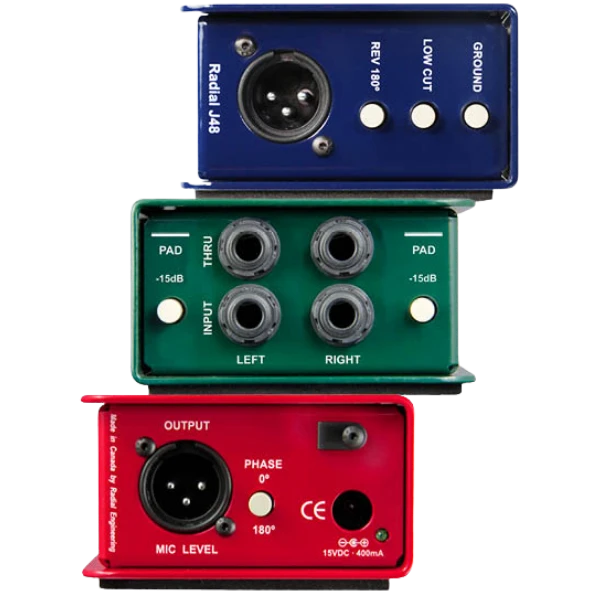
DI stands for direct injection (or direct input). A DI box sits between an instrument and the mixer. You plug the instrument into the DI's 1/4" jack input, and run a standard XLR microphone cable from the DI's output to the mixer or stage box. Inside, it does three jobs:
- Converts unbalanced to balanced, so the signal can travel long distances without picking up noise.
- Converts high impedance to low impedance, which stops long cables from dulling the top end of the sound.
- Lowers the level to mic level, so it plugs into the same XLR inputs as microphones. A pad switch reduces very hot signals further.
Most DI boxes also have a ground lift switch that breaks ground loops, the classic cause of a constant low hum.
Unbalanced signals: simple, but noisy over distance
Most instruments and consumer devices, such as keyboards, synths, drum machines, DJ controllers, laptops and guitars, have unbalanced outputs. An unbalanced cable (like a regular guitar lead with a TS jack) has just two conductors:
- a signal wire carrying the audio, and
- a shield wrapped around it, connected to ground.
The shield blocks some interference, but not all of it. Every metre of cable acts like an antenna, picking up hum from power cables, buzz from lighting dimmers and LED drivers, and even radio and mobile phone signals. On an unbalanced cable, whatever noise gets onto the signal wire goes straight to the mixer, and there's no way to separate it from the music. That's fine for a short lead from a guitar to an amp, but on stage the mixer is often 10 to 30 metres away, and the noise adds up fast.
Balanced signals: how they cancel noise
A balanced cable (an XLR mic cable, or a TRS jack) has three conductors: two signal wires, called hot (+) and cold (−), and a shield. The trick is in what goes down those two wires.
Step 1: the signal is sent twice, once flipped upside down
The DI box sends the audio down the hot wire as normal, and sends an identical copy with its polarity reversed (flipped upside down) down the cold wire. Where the hot signal goes up, the cold signal goes down by exactly the same amount.
Step 2: noise lands on both wires the same way
The two signal wires are twisted tightly together inside the cable, so they travel the same path through the same electrical environment. Any interference along the way, whether hum, buzz or radio noise, is picked up equally by both wires, with the same polarity. Now hot carries "audio + noise" and cold carries "inverted audio + noise".
Step 3: the mixer flips the cold wire back
At the other end, the mixer's balanced input flips the cold wire's polarity back again. The audio on the cold wire is now the right way up, matching the hot wire. But the noise on the cold wire, which was never inverted in the first place, is now upside down.
Step 4: adding them together cancels the noise
The mixer adds the two wires together. The two copies of the audio line up and add together. The noise on hot and the inverted noise on cold are exact opposites, so they cancel each other out. What's left is clean audio. This is called common-mode rejection, and it's why balanced cables can run tens of metres across a stage without picking up hum.
1. The DI box splits the signal
Hot carries the audio. Cold carries an identical copy flipped upside down.
2. Noise hits both wires equally
Interference along the cable lands on both conductors the same way, with the same polarity.
3. The mixer flips cold back
The audio on cold is upright again, but the noise on cold is now upside down.
4. Add them together: noise cancels
The two copies of the audio add up, while the noise and the inverted noise cancel out.
Strictly speaking, what a balanced cable cancels is noise and interference picked up along the cable. It can't remove distortion or noise already present in the signal before it reaches the DI box, so a clean source still matters.
Why you need a DI box on stage
- Long cable runs without hum. The DI turns the instrument's unbalanced output into a balanced signal, so it can run to the mixer or stage box over XLR without picking up noise.
- The right level and impedance. Keyboards and laptops put out a line-level, unbalanced signal that doesn't match a mixer's mic inputs. The DI converts it so it sounds clear and full.
- Ground loop protection. When the keyboard and the PA are plugged into different power outlets, a ground loop can cause a constant hum. The DI's ground lift breaks the loop.
- A thru output for the musician. The thru jack passes the original signal on to a keyboard amp or monitor, while the XLR output goes to front-of-house.
- Fewer stage problems. One standard XLR connection for every source makes patching faster and more reliable.
What needs a DI box?
| Source | DI needed? | Best type |
|---|---|---|
| Stereo keyboard or synth | Yes | Stereo passive (Radial ProD2) |
| DJ mixer or controller | Yes, if the mixer is far away | Stereo passive (Radial ProD2) |
| Laptop or backing tracks | Yes | Stereo passive, with ground lift for laptop hum |
| Acoustic guitar with active pickup | Yes | Passive |
| Bass or guitar with passive pickups | Yes | Active DI |
| Microphones | No, already balanced | None |
Passive vs active DI boxes
Passive DI boxes use a transformer to balance the signal. They need no power, are extremely reliable, and handle hot signals well, which makes them ideal for keyboards, synths, DJ mixers and laptops. Active DI boxes have a built-in preamp powered by phantom power or batteries, and suit weak, high-impedance sources like passive bass and guitar pickups.
Hire a Radial ProD2 stereo DI box in Sydney
We hire the Radial ProD2 stereo passive DI box for $15 each per event. It's a two-channel passive DI, so one box handles a stereo keyboard, DJ mixer or laptop. Each channel has a 1/4" input and thru jack, a balanced XLR output and a −15dB pad, plus a ground lift to kill hum.
Pair it with a mixer from our mixer range, such as the Behringer X AIR XR18 (see our guide to running band in-ear monitors on the XR18), and browse all our stage equipment.