How to Mix and EQ Male and Female Vocals: A Live Sound Guide
· 8 min read · Party Backline
The vocal is the most important thing in almost any live mix. At a wedding it's the speeches, at a gig it's the singer, and at a party it's the MC. If the words aren't clear, nothing else matters. This guide covers the basics of mixing and EQ-ing vocals live, and how the approach differs for male and female voices.
How male and female voices differ
Every voice has a fundamental, the pitch you hear, plus a stack of harmonics above it that give it character and clarity. On average, female voices sit about an octave higher than male voices. A man typically speaks with a fundamental around 85 to 180 Hz, and a woman around 165 to 255 Hz. Singers go much wider:
So the same EQ move lands differently on each voice. A high-pass filter at 150 Hz is harmless on most female voices but thins out a baritone. The "mud" area and the harsh area also shift up a little for higher voices. The ranges below are starting points, and the only rule that always applies is: listen.
Step 1: set the gain properly
Before touching EQ, get the input gain right. Ask the singer or speaker to perform at their loudest real level, not a quiet "check, check", and set the gain so the channel meter peaks comfortably below clipping. Then use the fader for the actual level in the mix. Too little gain makes everything noisy, and too much distorts the loudest notes and makes feedback more likely.
Mic technique matters as much as the mixer. Directional mics like the Shure SM58 have a proximity effect: the closer you get, the more bass they pick up. A deep male voice right on the grille can become boomy, while a singer who backs off loses body. Ask performers to keep a fairly consistent distance, about 2 to 5 cm.
Step 2: high-pass filter
The high-pass filter (HPF, sometimes called low cut) removes everything below a set frequency. On a vocal, that's mostly rumble, handling noise, wind and spill from the kick drum, bass and subwoofers, none of which you want in the vocal channel.
- Male vocals: start around 80 to 100 Hz. Go lower for a deep bass voice.
- Female vocals: start around 120 to 150 Hz.
Sweep the filter up until the voice starts to sound thin, then back off a little. It's the single most useful vocal EQ move.
Step 3: cut before you boost
Most vocal problems are something there's too much of, so start by cutting. A useful trick: set a band to a narrow boost of about 6 to 8 dB, sweep it slowly until the problem jumps out, then turn that boost into a cut of a few dB. Cut narrow, boost wide, and keep moves small. Two or three dB is often enough.
| Range | What it sounds like | Male vocal | Female vocal |
|---|---|---|---|
| Below the HPF | Rumble, thumps, wind | Cut below 80–100 Hz | Cut below 120–150 Hz |
| Body | Warmth and weight | 120–250 Hz | 200–350 Hz |
| Mud / boxiness | Muffled, "cardboard box" | Cut around 200–400 Hz | Cut around 300–600 Hz |
| Nasal / honky | Telephone-like, through the nose | Around 800 Hz–1.5 kHz | Around 1–2 kHz |
| Presence | Clarity, words cut through | Gentle boost 3–4 kHz | Gentle boost 4–5 kHz |
| Harshness | Piercing, tiring to listen to | Around 2–4 kHz | Around 2–4 kHz, often narrow |
| Sibilance | Sharp "s" and "t" sounds | Around 5–8 kHz | Around 6–9 kHz |
| Air | Breath, sparkle, openness | Shelf from 10 kHz | Shelf from 10–12 kHz |
Step 4: add presence and air
Once the problems are cut, a gentle, wide boost in the presence range helps the words cut through the band and the room. Male voices usually respond well around 3 to 4 kHz. Female voices often already have plenty of energy there, so a lift slightly higher, around 4 to 5 kHz, plus a small cut at any harsh spot, works better. A small high shelf adds "air". Go easy: boosting the top end on a live vocal also boosts sibilance, cymbal spill and the frequencies most likely to feed back.
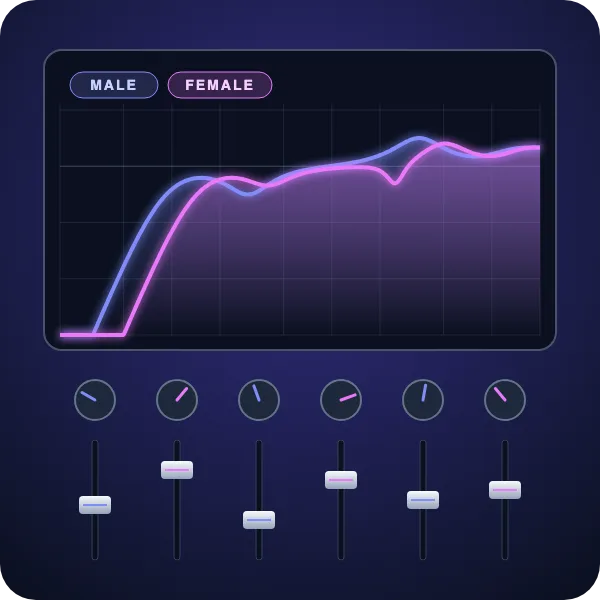
Here's how those starting points look as EQ curves. Switch between the two voices to compare:
- High-pass at 90 Hz
- Cut 3 dB at 300 Hz (mud)
- Boost 3 dB at 3.5 kHz (presence)
- High shelf +2 dB from 10 kHz (air)
Step 5: compression
Singers and speakers move between whispering and belting. A compressor evens that out by turning down the loudest moments, so you can set a level where quiet words are still heard and loud notes don't jump out.
- Ratio: 3:1 to 4:1.
- Threshold: set it so the loudest phrases get about 3 to 6 dB of gain reduction.
- Attack: fairly fast, around 5 to 15 ms, to catch peaks without killing the start of words.
- Release: around 100 to 200 ms, or auto.
Female and male voices use the same settings as a starting point, but dynamic singers in any style need more control than steady speakers. Don't over-compress a live vocal: the compressor brings up everything else the mic hears along with the voice, which makes it more prone to feedback.
Step 6: a touch of reverb and delay
A little reverb makes a dry vocal sound natural and polished. A plate or short hall with a decay of around 1 to 1.5 seconds suits most songs, and a short pre-delay (20 to 40 ms) keeps the words clear before the reverb blooms. For ballads, a quiet delay timed to the song adds depth without washing out the words. Use effects on a send, keep them subtle, and turn them off for speeches, where clarity is everything.
Step 7: make the vocal sit in the mix
- Make space rather than push the fader. Guitars and keyboards share the 2 to 4 kHz range with the voice. Pulling that range back a little on those instruments often clears the way for the vocal better than turning the singer up.
- Watch duets. When a male and female voice sing together, the lower voice can mask the higher one. Balance them by ear, and if they clash, cut a little body from the lower voice.
- Check from the audience. Walk out front: what sounds right next to the mixer may be different at the back of the room.
- Mute unused mics. Every open mic adds spill and noise to the vocal sound.
Quick reference
| Step | Male vocal | Female vocal |
|---|---|---|
| High-pass filter | 80–100 Hz | 120–150 Hz |
| Cut mud | −2 to −4 dB around 250–400 Hz | −2 to −3 dB around 300–500 Hz |
| Presence | +2 to +3 dB around 3–4 kHz | +2 dB around 4–5 kHz, cut harsh spots |
| Air | +1 to +2 dB shelf from 10 kHz | +1 to +2 dB shelf from 10–12 kHz |
| Compression | 3:1–4:1, 3–6 dB reduction | 3:1–4:1, 3–6 dB reduction |
Hire vocal mics and mixers in Sydney
For live vocals, we hire the Shure SM58 and wireless systems like the Shure SLXD. The Behringer X AIR XR18 digital mixer has a high-pass filter, parametric EQ and compressor on every channel plus built-in reverb and delay, and you can mix from a tablet while walking the room. Not sure which mic to choose? Read our guide to choosing a microphone for your event, or browse our mixers.