Microphone Feedback: What Causes That Squeal and How to Stop It
· 7 min read · Party Backline
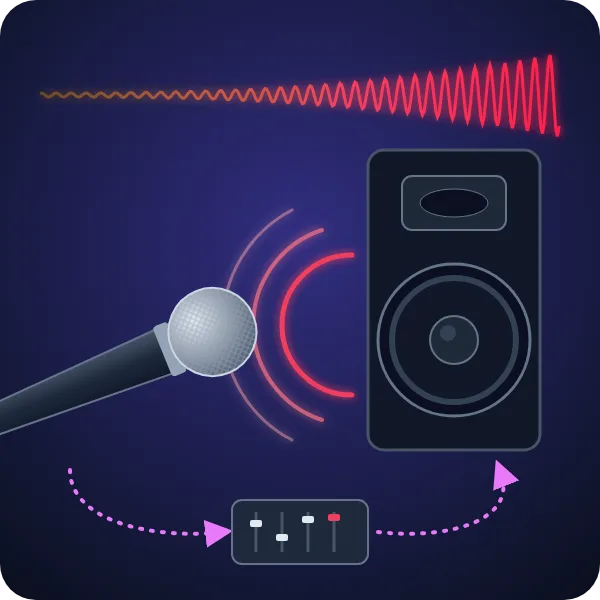
Everyone knows the sound: a speech starts, someone steps forward, and the PA lets out a piercing squeal. That's microphone feedback. It's the most common sound problem at parties, weddings and gigs, and it's almost always preventable. This guide explains what feedback is, what usually causes it, and how to get rid of it.
What is microphone feedback?
Feedback (also called the Larsen effect) is a loop. The microphone picks up sound, the mixer amplifies it, and the speaker plays it. If some of that speaker sound gets back into the same microphone, it gets amplified again, played louder, picked up again, and so on, hundreds of times a second.
Whether this loop dies away or runs out of control depends on the loop gain. If the sound coming back into the mic is quieter each time around, nothing happens. Once it comes back as loud or louder at any single frequency, that frequency builds up into a howl (low frequencies), a ring (mids) or a squeal (highs). The loudest you can turn a mic up before this happens is called gain before feedback. Everything below is about getting more of it.
What causes feedback?
Pointing the mic at the speakers
A handheld mic is most sensitive at the front. Point it at a speaker, or walk out in front of the PA, and it picks up the speaker at full sensitivity. This is the classic cause at speeches: the presenter wanders towards the guests, passes in front of the speakers, and the system squeals. Wireless mics make this easy to do.
Cupping the microphone head
Singers and rappers often wrap a hand around the grille. Directional mics like the SM58 rely on ports in the back of the grille to cancel sound arriving from behind. Cover them and the mic loses its directional pattern, becoming close to omnidirectional, so it now hears the monitors and the PA as well as the voice. Cupping also adds a boxy, honky resonance that the system quickly feeds back on. Hold the mic by the handle, not the head.
Too much gain
The more you turn up a mic, the less spill it takes to start the loop. Gain usually creeps up because the source is too quiet: a softly spoken guest, a singer holding the mic at chest height, or a presenter talking to the room instead of into the mic. Sound drops off with distance (the inverse square law), so every time the distance from mouth to mic doubles, you lose about 6 dB and the engineer has to add 6 dB of gain to compensate. That extra gain applies to the speaker spill too.
Monitors in the wrong place
Foldback wedges point straight at the performers, and therefore straight at the mics. A wedge placed in the mic's most sensitive area is a feedback machine. Where it should go depends on the mic's pickup pattern (see the diagram below).
Too many open microphones
Every live mic adds another path for the loop. As a rule of thumb, doubling the number of open mics costs about 3 dB of gain before feedback. A lectern mic, two handhelds and a band's vocal mics all left on add up quickly.
Other common causes
- Hard, reflective rooms. Glass, tiles and bare walls bounce speaker sound back towards the mics.
- EQ boosts. Boosting treble for "clarity" or bass for "warmth" also boosts the loop at those frequencies.
- Sensitive mics. Condenser, omnidirectional, lapel and headset mics pick up much more of the room than a handheld dynamic mic held close.
- Speakers behind the mic line. If the main speakers are set up behind or level with the performers, the mics hear them directly.
How to defeat feedback
1. Put the speakers in front of the mics
The single biggest fix. Set up the main speakers forward of the performers and the lectern, pointing away from the stage and towards the audience. The mics then sit behind the speakers, where the speakers are quietest. Keep presenters with wireless mics behind that line.
2. Use directional mics and aim them away from speakers
A cardioid or supercardioid dynamic mic is much less sensitive to the sides and back. Point the front of the mic at the mouth and the back towards the speakers and monitors.
3. Put monitors in the mic's deaf spot
A cardioid mic like the Shure SM58 is least sensitive directly behind, so a single wedge goes right behind the mic. A supercardioid mic like the Shure Beta 58A is tighter at the sides but has a small lobe at the back. Its deaf spots are at about 126° on each side, so wedges work best angled in from the sides rather than straight behind.
Cardioid (e.g. Shure SM58)
Deafest directly behind. Put a single wedge straight behind the mic, at the singer's feet.
Supercardioid (e.g. Shure Beta 58A)
Deafest at about 126° on each side, with a small lobe at the back. Use two wedges angled in from the sides.
4. Get close to the mic and lower the gain
Ask speakers and singers to keep the mic about 2 to 5 cm from their mouth and to talk into it, not over it. Halving the distance gives about 6 dB more voice, so you can turn the gain down by the same amount. That one change often stops feedback on its own.
5. Mute the mics you're not using
Only keep mics open while someone is using them. At speeches, mute the lectern mic when the handheld is in use, and the other way round.
6. Ring out the system with EQ
Feedback starts at a few specific frequencies, set by the room and the speaker placement. Before the event, slowly raise the mic gain until it just starts to ring, find that frequency, and cut it with a narrow EQ cut of a few decibels. Repeat for the next two or three rings. Turn on the high-pass filter on vocal mics too, as it removes low rumble that can turn into a howl. Many digital mixers, including the Behringer X AIR XR18, have the parametric EQ needed to do this.
7. Switch to in-ear monitors
For bands, the most effective fix for monitor feedback is to remove the wedges altogether. In-ear monitors put the mix straight into the musicians' ears, so there's nothing on stage for the mics to pick up. See our guide to running in-ear monitors on the XR18.
Quick feedback checklist
| If it's feeding back when… | Try this first |
|---|---|
| A presenter walks around | Keep them behind the speaker line |
| A singer holds the mic by the head | Hold the handle, mic close to the mouth |
| A quiet speaker is on the mic | Move the mic closer before adding gain |
| The band's monitors are loud | Reposition wedges to the mic's deaf spot, or use in-ears |
| The same note rings every time | Find it and cut it with a narrow EQ |
| Several mics are on stage | Mute every mic not in use |
Hire microphones and PA in Sydney
Our handheld Shure SM58 is the classic cardioid vocal mic, and our Shure SLXD wireless with a Beta 58 capsule gives you a supercardioid pattern with excellent rejection. For help choosing, read which microphone you need, or browse our speaker sets. If we're delivering and setting up, tell us where the speeches or performers will be and we'll place the speakers to suit.